
Intellectual Property
Trademark Search Australia: How to Check if a Name or Logo is Taken
The short answer
A trademark search in Australia tells you whether a name, logo or slogan is already registered or being applied for before you commit to it. You can do a basic search yourself, for free, using IP Australia's two official tools: Australian Trade Mark Search and TM Checker.
The important thing to understand from the outset is what a search can and cannot prove. It can reliably tell you a name is already taken. It cannot reliably tell you a name is clear to use, because the final decision rests on legal tests that an examiner applies by hand and that no database can run for you.
What is a trademark search?
What free tools can I use for a trademark search in Australia?
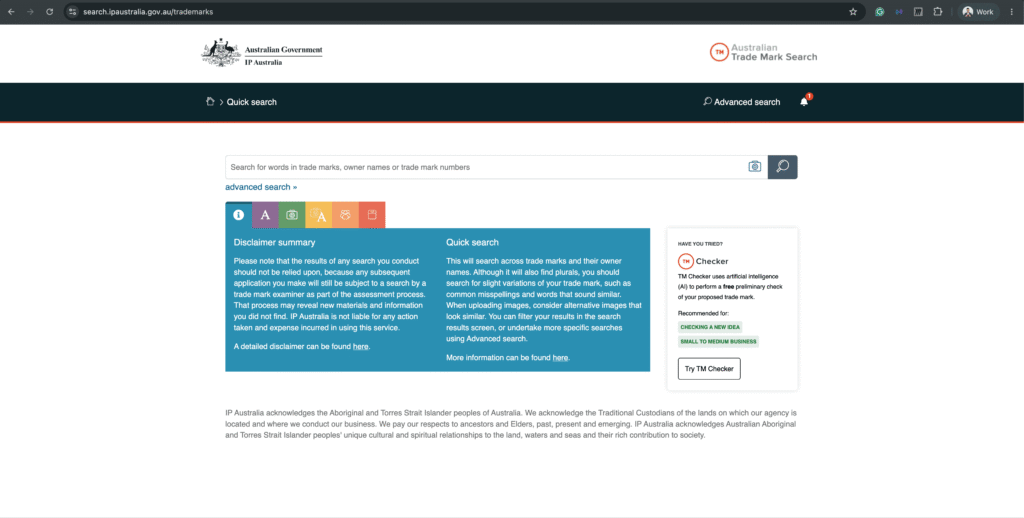
IP Australia runs two free search tools, and each does a different job. Start with the AI checker for a quick read on whether your name or logo is likely to face problems, then move to the full public register to search every mark already on file.
TM Checker
A free app from IP Australia that uses AI to flag whether your proposed name or logo is likely to face problems at examination. It checks your mark against IP Australia's own data and past examiner decisions in about a minute. You don't need an account to run it; you only create one if you go on to apply. IP Australia recommends it for checking a new idea and for small to medium businesses, so use it as your first quick gut check.
Open TM Checker ↗Australian Trade Mark Search (ATMS)
The Australian Government's official search system, covering every registered and pending trade mark in the country. Use Quick search for most everyday lookups across marks and owner names; it also picks up plurals and close variations. Use Advanced search to filter by class, status and owner when you need to narrow things down. This is where you do the real digging once the checker points you in the right direction.
Open Trade Mark Search ↗How do I use the ATMS Advanced search?
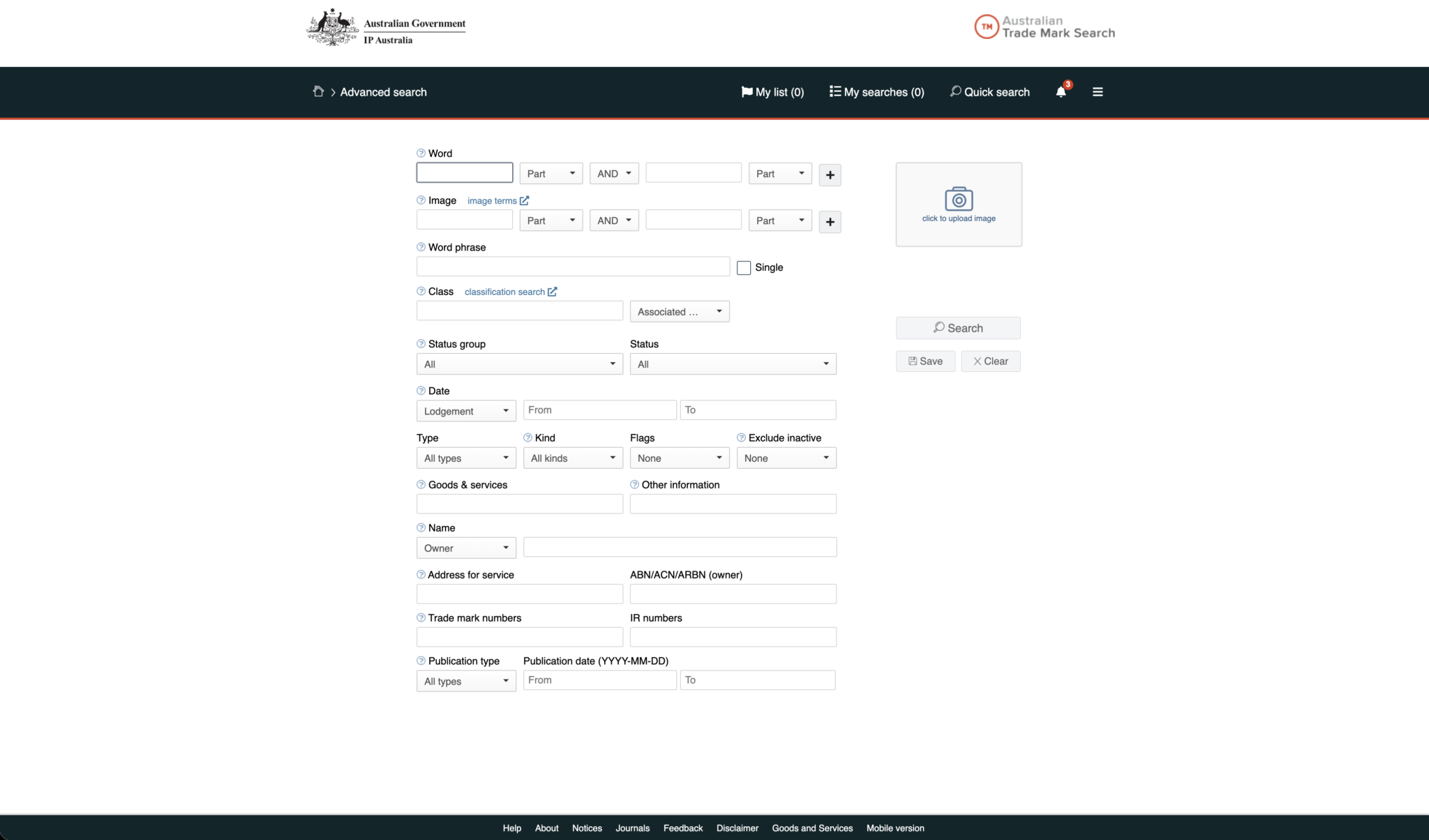
Advanced search looks intimidating because it shows every field at once, but you only need a handful for a clearance check. It splits the register into separate filters, so you can build a precise query and narrow thousands of marks down to the few that could actually affect you. Below is what each field does, in the order it appears on screen, with the ones that matter most called out.
Word▾
You put your brand name here, and the Part / Whole dropdown controls how strictly the tool matches it. "Part" finds your word even when it sits inside a longer word, which casts a wider net and surfaces marks that merely contain your name; "Whole" matches only the exact word on its own. The AND / OR dropdown and the second box let you test two words together, and the plus button adds further rows. Start with "Part" so you see as much as possible, and run a few variations as well, such as common misspellings or words that sound the same, because marks are judged by how they look and sound, not just by an exact match.
Image▾
The Image field, and the "image terms" link beside it, let you search logos by their visual content rather than any words they contain. IP Australia codes every figurative mark by the elements it includes, such as a particular shape, an animal or a device, and this field searches against those codes, which you choose through the "image terms" link. It is more powerful than the image upload on Quick search and matters most when your brand is built around a distinctive graphic, because a competing logo can be a problem even if its wording is nothing like yours.
Word phrase▾
For a slogan or tagline of several words, where the combination and order are the point. It searches the words together as a phrase rather than hunting for each one separately, and ticking the Single box tells the tool to treat your entry as one exact string. Use it when you want to know whether a specific phrase is already claimed, rather than whether the individual words happen to appear somewhere on the register.
Class Most important▾
The most important filter on the page, and the one most people overlook. Australian trademarks are organised into 45 classes of goods and services, and your protection only ever extends to the classes you register in. The flip side is that you are only blocked by marks in the same class, or a closely related one, so a business using your exact name in an unrelated field is usually no obstacle at all. Enter the class numbers you intend to trade in, or use the "classification search" link if you are unsure, and remember a single product can span more than one class. This is where a do-it-yourself search most often goes wrong: a name can look free across the whole register yet still be blocked once you filter to the classes that matter, because the law only refuses your application over an earlier mark covering similar goods or closely related services.
Status group and Status▾
These filter by where a mark sits in its life cycle, from a pending application through to registered, lapsed, removed or refused. In practice it is easier to leave both on "All" and read the status against each result, using the status table further down this page, because a mark does not have to be fully registered to cause trouble. A pending application with an earlier filing date can still block you, and a recently lapsed mark can sometimes be restored, so it pays to look rather than filter these out too early.
Date▾
Set to "Lodgement" by default, with "From" and "To" boxes, this filters by when marks were lodged, and it matters more than it first appears. Australian trademark law generally gives priority to whoever filed first, so the lodgement date is what decides who has the stronger claim. A mark lodged before yours is the one with the power to block you; one lodged after usually cannot. When you find a potential conflict, the first thing to check is whether its lodgement date falls before or after the date you intend to file.
Type, Kind, Flags and Exclude inactive▾
These narrow your results to particular categories of mark, such as standard marks versus collective or certification marks. Most can be left alone on a first pass. The one worth setting is Exclude inactive, which hides dead marks so you are left looking only at the live rights that can genuinely be asserted against you, keeping the result list short and relevant while you get your bearings.
Goods & services▾
This searches the actual written descriptions of what each mark covers, rather than just its class number. It is how you tell whether an existing mark in your class really competes with you or simply shares the same broad heading, since two businesses can sit in the same class while operating in entirely different corners of it. Reading the wording closely here often turns an apparent conflict into a non-issue, or the reverse.
Name, Address for service and ABN / ACN / ARBN▾
Set to "Owner", along with Address for service and the ABN/ACN/ARBN (owner) field, these search by who owns a mark rather than by the mark itself. This is how you pull up a competitor's entire portfolio in one go, confirm who actually controls a mark you are concerned about, or check what a company has already protected before you approach them. Owner searching is precise, so try a few variations of a company name if the first attempt comes back thin.
Trade mark numbers and IR numbers▾
For going straight to a specific application or registration when you already know its number. "IR" stands for International Registration, a trademark filed through the international Madrid system and then extended to cover Australia. These are easy to miss in an ordinary name search but carry exactly the same weight as a locally filed mark, so a foreign brand that has designated Australia can still stand in your way.
Publication type and date▾
These filter by entries in IP Australia's official journal, which records steps such as acceptance and opposition. They are specialist tools used mainly by practitioners tracking deadlines, and you can safely ignore them for a clearance search.
Once your fields are set, you click Search on the right. You can also Save the search to your account to return to it later, or Clear to reset every field. For a first clearance pass, the combination that does most of the work is a "Part" word search, narrowed to your classes, with inactive marks excluded.
How do I read trademark search results in Australia?
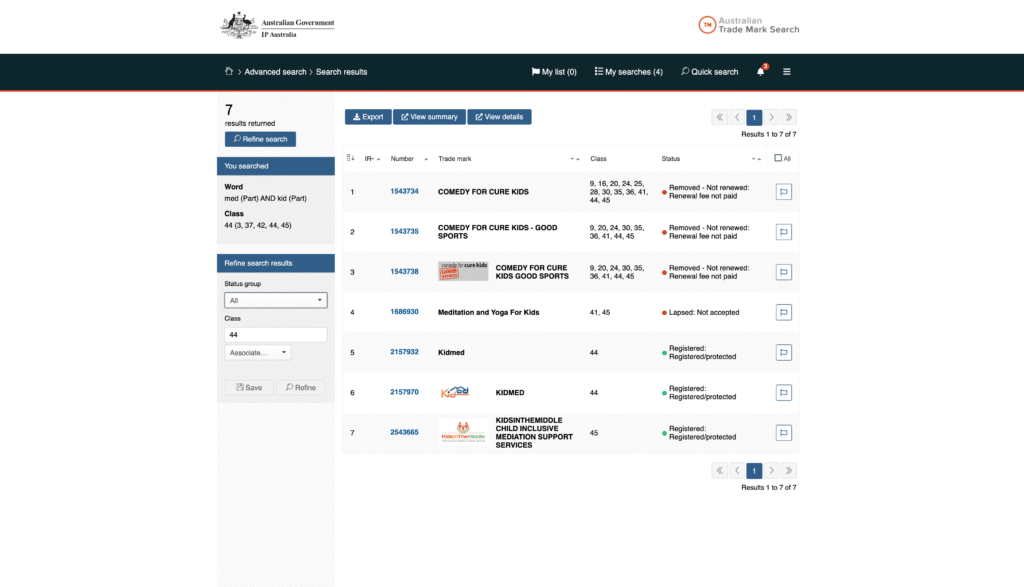
After you click Search, ATMS returns a results list, and reading it correctly is the first decision point. The example below is a real search for a medical centre weighing the name "Kidmed", built in Advanced search with the Word field set to "med" AND "kid", both on Part matching so the tool finds those letters anywhere in a word, and filtered to Class 44, the class for medical and healthcare services. It returned seven results that between them cover the four outcomes you need to tell apart: a dead mark, a lapsed application, a live word mark and a live logo mark.
Each row runs across four columns, Number, Trade mark, Class and Status, but read Status first. The coloured dot in that column tells you immediately whether a mark is alive.
Status at a glance
Check your query first▾
The panel on the left under "You searched" restates your exact query, here "med (Part) AND kid (Part)" with the Class 44 filter. Check this first whenever a result set looks too short or too long, because the usual cause is a filter that was narrower or broader than you intended. The same panel holds Refine search, the Status group dropdown to hide dead marks, and the class box, so you can adjust without starting again.
The four dead results (rows 1 to 4)▾
Rows one to three are three versions of "Comedy for Cure Kids", each with a red dot and "Removed, not renewed: renewal fee not paid". They were registered once, but the owner stopped paying the renewal fees, so they have come off the register. Row four, "Meditation and Yoga For Kids", shows a red dot and "Lapsed: not accepted", meaning the application never reached registration. All four are dead, and none of them stands in your way.
The two live registrations that matter (rows 5 and 6) Direct conflict▾
Row five is the one that counts: "Kidmed", number 2157932, Class 44, green dot, "Registered: registered/protected". This is a live, registered word mark for the exact name, in the exact class the medical centre needs, so it is a direct conflict and the record you would open in full. Row six, "KIDMED", number 2157970, is also live and in Class 44, but the small image in the Trade mark column shows it is a logo mark. The name is therefore protected both as a plain word and as a logo, held as two separate registrations.
The weak match in another class (row 7)▾
Row seven, "KidsInTheMiddle", is live but sits in Class 45 and only shares the letters "kid". It appears because "kid" matched, but a different name in a different class is a weak conflict at most.
Of seven matches, then, four are dead, one is a different name in another class, and two are live registrations of the exact name in the exact class. Reading the status dots first lets you set aside five of the seven in seconds and spend your attention on the two that count.
How do I read a trademark's full record?
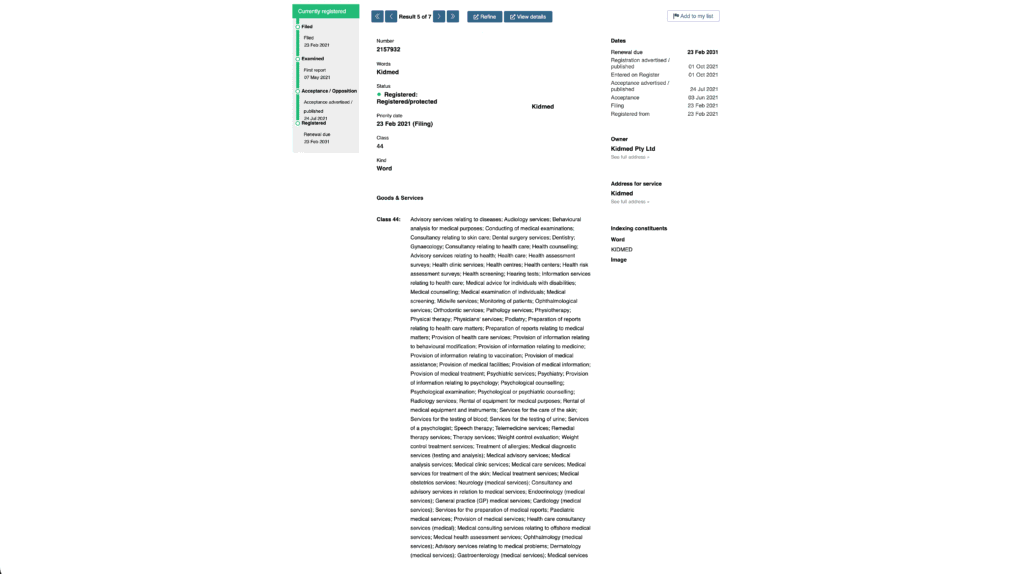
Clicking a result opens its full record. The detail page for "Kidmed" above contains every fact you need to decide whether the mark genuinely blocks you, and each field answers a specific question.
The key facts
The Number, 2157932, is the mark's unique identifier, used to reference it in any application, objection or advice. The Words field confirms the mark is "Kidmed." The Status, "Registered: Registered/protected" with a green dot, confirms it is live and enforceable today, not merely applied for.
The Priority date, 23 Feb 2021 (Filing), establishes the order of rights. Australian law gives priority to the earlier filer, so this owner's rights run from February 2021. An application you filed now would rank behind theirs, and under section 44 that later priority date is itself a ground for rejecting your application. The Class, 44, confirms the mark sits in the field you want. The Kind, Word, means it is a word mark, protecting the name "Kidmed" in any font or styling. A word mark is broader than a logo mark and harder to design around, because changing the styling does not avoid it.
The timeline and side panels
The timeline down the left records the mark's progress from Filed (23 Feb 2021), through Examined and Acceptance, to Registered, with Renewal due 23 Feb 2031. The mark is current and paid up for the next several years, so it will not lapse on its own and cannot be waited out.
On the right, the Owner panel names Kidmed Pty Ltd, the party you would be in conflict with, with "See full address" for their details. The Address for service is the mark's official contact point, frequently the owner's trademark attorney or lawyer. The Indexing constituents panel shows how IP Australia has catalogued the mark's word and image elements for searching.
Goods and services: the field that confirms the conflict
The Goods & Services block is what confirms whether the conflict is real. Two marks can share a name and a class and still coexist if they cover genuinely different goods or services, so you check the actual descriptions, not just the class number. Here, the Class 44 description is long and comprehensive: advisory services relating to diseases, health care, health clinic services, medical examinations, physiotherapy, psychiatry, telemedicine, general practice medical services and many more. For a medical centre, it covers the full range of what they would offer, which leaves no untaken sub-category to register within. The name is registered, in the relevant class, across the relevant services, by an owner whose rights predate any application you could file now and whose registration runs to 2031.
What the record cannot tell you
Reading the record tells you this specific mark blocks "Kidmed." What it does not tell you is how far you would need to move to clear it: whether a variation such as "KidMed Clinic" or "Kidz Medical" is different enough to escape a section 44 objection, or whether honest concurrent use might support coexistence. Those turn on whether a mark is deceptively similar, which is a legal judgment rather than a database result. That is the point at which a trademark lawyer is worth engaging, rather than guessing from the register.
Can a free trademark search tell me if I can register my name?
A clear search result and a registrable name are not the same thing. Behind the simple question "can I register this" sit several separate legal judgments, and the register answers none of them. Each is assessed against the facts of your business, which is why a name can come back clean and still be refused.
The reach of the conflict
Take the reach of the conflict first. Section 44 does not only block names that clash on identical goods or services. It blocks marks that are too close when used on similar goods or closely related services. For the medical centre, that means an existing mark registered for medical services could stand in the way of a name you wanted for an arguably different but adjacent service, say a wellness or allied-health offering, if an examiner views the two as closely related. Where "closely related" begins and ends is not marked anywhere in the database. The class filter shows you Class 44; it does not tell you that a Class 44 registration can reach into your plans in Class 41 or Class 45, or that it cannot. That judgment is made case by case.
Whether a conflict can be overcome
Then there is the question of whether a conflict can be overcome, which the register hides because it only shows outcomes, never the routes to them. Honest concurrent use under section 44(3) can allow even a deceptively similar mark onto the register where two businesses have genuinely traded under their names alongside each other without actual confusion. But it is not a box you tick. It has to be proven, with dated evidence of your use: invoices, advertising, sales figures, packaging, the kind of record that shows continuous and honest use over time. Prior continuous use can work similarly. Whether either path is open to you depends entirely on what your business has actually done and what you can document, none of which appears in a search result.
Whether the name is distinctive enough
Distinctiveness runs the opposite way, which catches people who assume a clear search is the finish line. Even with no conflicting mark anywhere, your name can still be refused under section 41 if it is not capable of distinguishing your services, the "Apple for apples" problem. A descriptive medical-centre name can return zero conflicts and still fail, because the register never assessed whether the words were distinctive enough to belong to one owner.
Put together, deciding whether a name is registrable means weighing deceptive similarity, the reach of similar and closely related goods and services, the exceptions that might rescue a conflicted mark, and distinctiveness, all against the specific facts of your business. That is a different exercise from searching, and it is the difference between the two columns below.
| Free DIY search (TM Checker and ATMS) | Professional clearance search | |
|---|---|---|
| Cost | Free | From around $500 |
| Exact matches | ✓ Yes | ✓ Yes |
| Phonetic and visual lookalikes | Limited | ✓ Yes |
| Related and adjacent classes | Often missed | ✓ Yes |
| Common law and unregistered marks | ✗ No | ✓ Yes |
| Opinion on whether you can actually register | ✗ No | ✓ Yes |
| Best suited to | An early sense-check | Any brand you would mind losing |
The sensible way to use both is to split the work. Run the free tools yourself to do what they do well: rule out the names that are already taken, so you do not waste time or money chasing them. Bring in a professional clearance search and registrability opinion once you have a name worth keeping, because that is the stage where the judgments above decide whether you can actually own it.
The free search tells you whether a name is taken. A trademark lawyer tells you whether a name can be yours.
Meet Your Trademark Lawyers
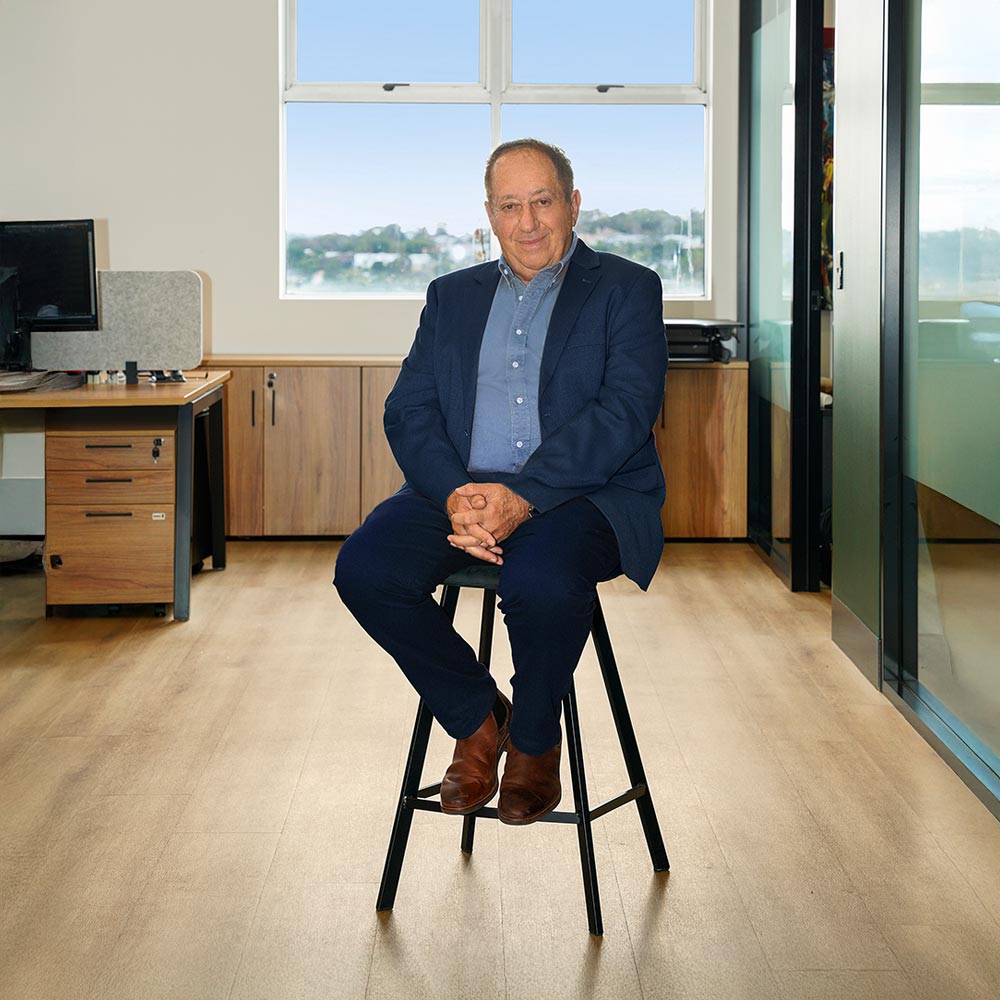
CEO, Notary Public
With over 50 years in law, Barry advises businesses on trade mark protection, franchising, mergers and acquisitions, and business structuring.

Director, Principal Solicitor
Admitted in NSW and England and Wales, Mark brings hands-on global IP experience from his time as Legal Counsel and Legal Director for Monster Energy across EMEA.
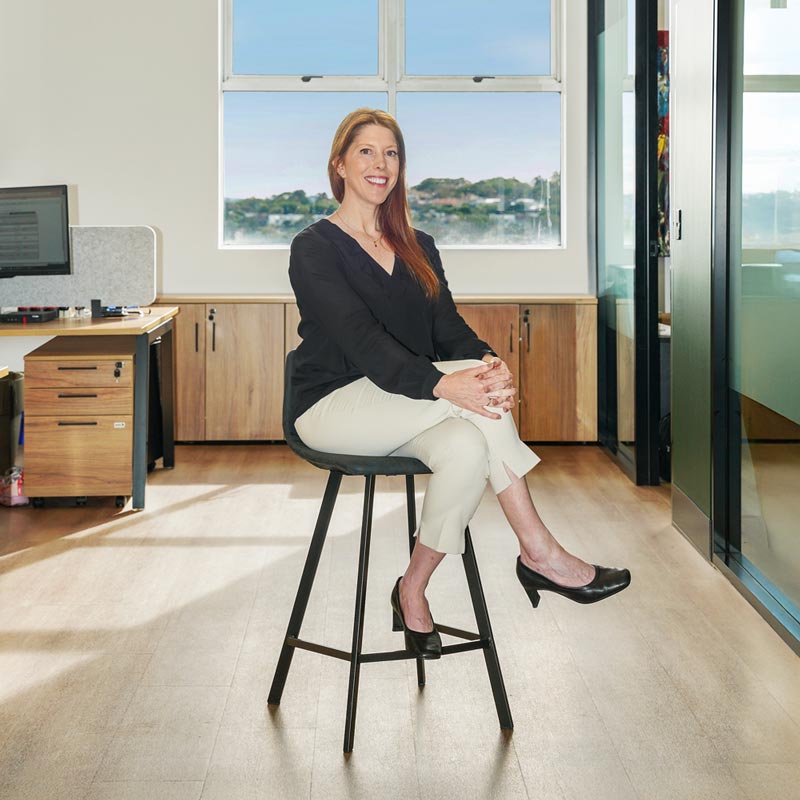
Associate Lawyer
Chen’s background spans legal practice, fund management, and compliance, bringing a sharp commercial perspective to IP and trademark matters.


- Launching a new brand?
Start Strong With Trademarks
- (02) 8644 6000
- info@lazaruslegal.com.au
- 1/422 Oxford St, Bondi Junction NSW 2022
- 5/133 Wakefield Street Adelaide SA 5000
- 1/14 Fremantle Street Burleigh Heads QLD 4220
Frequently asked questions
Can I do a trademark search myself?
Is a trademark search the same as a business name search?
How long does a trademark search take?
Does a clean search guarantee my application will be accepted?
What if my search finds a conflicting trademark?
Do I need to search overseas trademarks?

Principal Solicitor, Director, Lazarus Legal
Mark Lazarus is a Director at Lazarus Legal, admitted to practise in New South Wales and England and Wales. As former Legal Counsel and Legal Director at Monster Energy across the EMEA region, where brand protection and enforcement were central to his work, he brings practical, commercial IP experience to trademark clearance, registration and disputes. He has advised over 2,000 Australian founders and supported more than 500 trademark registrations.
Page Published: 26 June 2026 | Updated: 26 June 2026